⚡ Automations
Docflo.ai enables powerful automations to streamline document workflows, integrate with external systems, and manage secrets and dependencies securely.
- Automate document processing, validation, and routing
- Trigger actions based on document events or data
- Integrate with external APIs and services
- Secure secret management for credentials and tokens
- Support for custom dependencies and injected objects
🚀 How it works
- Go to the Automations section in the Docflo.ai platform.
- Create or edit an automation by defining triggers, actions, and conditions.
- Configure integrations with external APIs or services as needed.
- Manage secrets securely within the platform for use in automations.
- Test and activate your automation to streamline your workflow.
Automations in Docflo.ai help you eliminate manual steps, reduce errors, and ensure your document processes are efficient and reliable.
📋 Templates
Get started quickly by using pre-built automation templates. Click the three-dot menu and select "Select a template" to import existing working automations:
- Email Notification - Send automated email notifications based on document events
- Data Extraction - Extract and process data from documents automatically
- Webhook Integration - Connect with external systems via webhooks
- SAP SuccessFactors - Integrate with SAP SuccessFactors for HR document workflows
- Monday - Sync documents with Monday.com project management
- Microsoft Dynamics - Connect with Microsoft Dynamics for business process automation
- SAP S/4HANA Cloud - Integrate with SAP S/4HANA Cloud for enterprise workflows
- Priority ERP - Integrate with Priority ERP for enterprise workflows
📦 Dependencies
If you need to use npm packages in your automations, such as axios for server-side HTTP requests, add them under the "Dependencies" section. This ensures all required packages are available during automation execution.
Example dependencies:
axios- For HTTP requests to external APIslodash- For data manipulation utilitiesmoment- For date and time handling
Manager Tools / Docflo SDK
Following built-in methods are available wihin the manager SDK that allow you performing different platform actions, such as downloading binary file itslef, updating fields and fetching additional documents. Here are the available methods (all async):
manager.updateDocument(docData)- Updating document field values. Be careful in async executions, it overrides all document fields (including status, for instance)manager.updateStatus(statusId)- updates document status, see Statuses that can be passed to this callmanager.refreshApproval()- recalculates approval workflow. You can call it in case you updated fields that affect approvals and you want to re-route the document from scratchmanager.getDocuments(query)- Allows fetching other documents (for different comparison use cases / duplicate lookups)manager.patchModelFields(documentId, modelFields)- For updating of other document fieldsmanager.downloadDocument('original' | 'signed' | 'email')- downloads the binary content of the current document. In case of 'signed' it downloads the version that includes document log from the platform printed in the footer. In case of 'email' downloads the EML envelopemanager.getEmailAttachments()- returns an array of all attachments that were extracted from origin emailmanager.getDatasets()- returns a list of available datasetsmanager.getDatasetItems(datasetId, skip?, limit?)- returns dataset items you can iterate overmanager.getCredential(credentialsId)- returns credentials buy ID, which can be copied from "Security" areamanager.getLastApprover()- returns last approver user information, useful to note who was the last person that approved the document
Usage example - Updating documnent fields:
try {
  // Take the entire docflo_results and only update specific fields
  const updatedDocfloResults = {
      SomeFieldToUpdate: {
        value: "New Value",
        type: "string",
        confidence: 1,
        content: "New Value",
      },
  };

  await manager.patchModelFields(docId, doc);
  return true;
} catch (updateError) {
  console.log(`UPDATE FAILED: ${updateError instanceof Error ? updateError.message : String(updateError)}`,)
  return false;
}
🔐 Secrets
Store sensitive information securely using the Secrets section. This is ideal for:
- Server addresses and endpoints
- API keys and tokens
- Usernames and passwords
- Database connection strings
Usage in code:
// Access secret values using ${secret.KEY} syntax
const apiKey = secrets.API_KEY;
const serverUrl = secrets.SERVER_URL;
const username = secrets.DB_USERNAME;
🐛 Debugging automations
When an automation isn't behaving as expected, you can run it against a real document and inspect exactly what happens step by step.
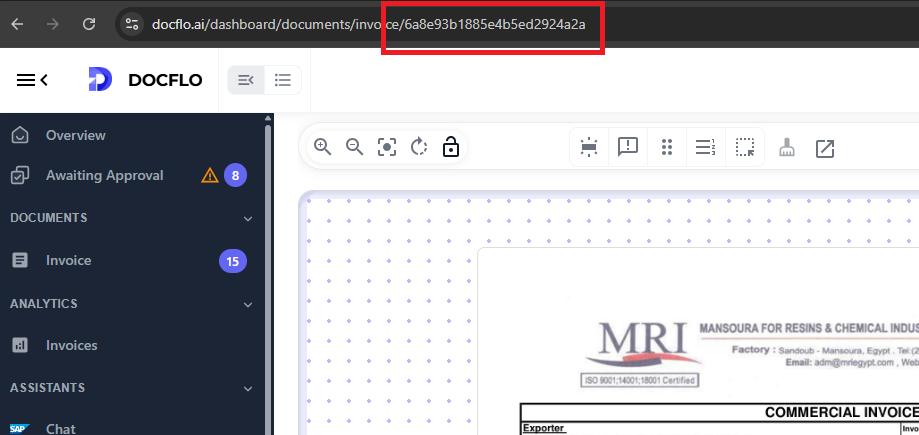
- Open a specific document you want to try the automation on, and copy its ID from the URL:
-
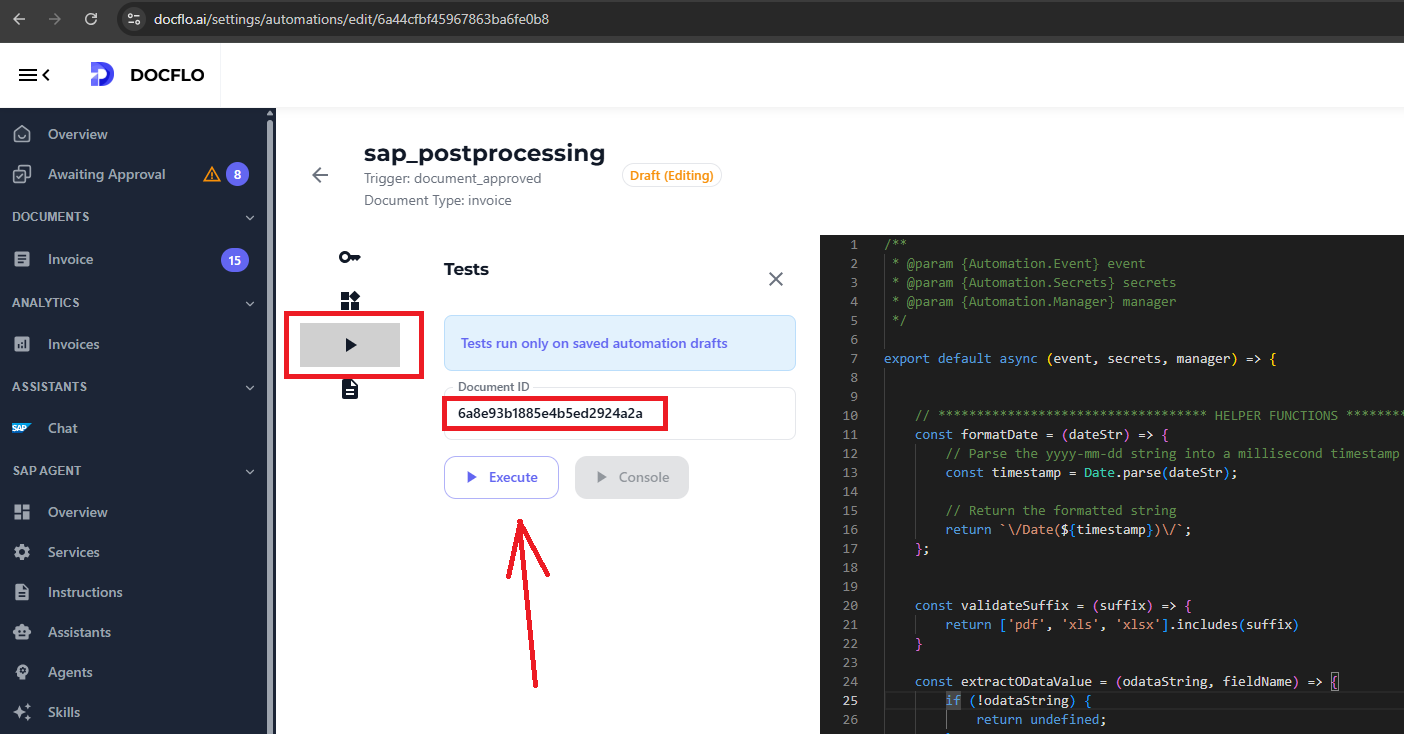
Navigate to Automations and select the automation you want to debug.
-
Inside the automation window go to Testing, paste your document ID and run:
Once the automation completes, you'll see the results in the console on the right:
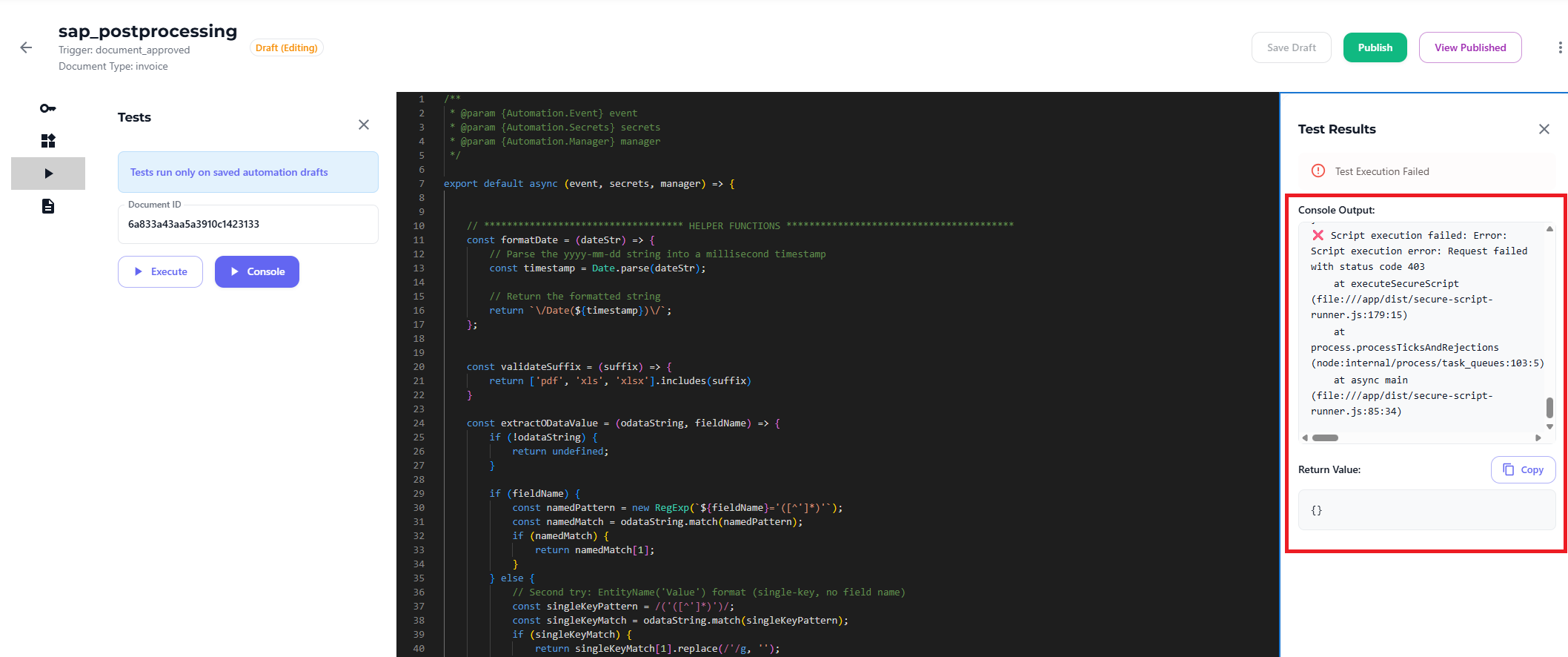
💡 Tip: Use console.log() to output any information you need during runtime.
💡 Tip: Please refer to Data Types for supported data structures and field types you can use within your automation.
For documentation on injected objects and advanced automation scenarios, consult your platform administrator or contact the Docflo.ai support team.