Create Your Own Document Types Without Complex AI Training

Your business processes unique documents that don't fit the standard invoice-receipt-contract mold. But every "document AI solution" forces you into their predefined boxes, leaving you with two terrible choices: manually process your custom documents or spend months training AI models from scratch.
What if you could create custom document types in minutes, define exactly the fields you need, and start processing immediately?
The Custom Document Processing Dilemma
Every organization has unique document workflows:
🏥 Healthcare Organizations
- Patient intake forms with custom medical fields
- Insurance claim documents with specific coding requirements
- Treatment authorization forms with complex approval matrices
🏭 Manufacturing Companies
- Quality control certificates with technical specifications
- Material safety data sheets with regulatory compliance fields
- Equipment inspection reports with maintenance tracking
🏗️ Construction Firms
- Project bid submissions with detailed cost breakdowns
- Safety inspection reports with photo documentation
- Permit applications with jurisdiction-specific requirements
🏦 Financial Services
- Loan applications with custom risk assessment fields
- KYC documents with regulatory compliance requirements
- Investment reports with performance tracking metrics
The Problem: Standard document types cover maybe 20% of your actual document processing needs. The other 80%? You're stuck with manual processing or expensive, months-long AI training projects.
The Hidden Costs of "Standard-Only" Solutions
Think you're saving money with basic invoice/receipt processing? Here's what you're actually losing:
Manual Processing Tax
- Administrative overhead: 15-20 minutes per custom document
- Error rates: 8-12% for complex manual data entry
- Staff frustration: Skilled employees doing repetitive data entry
- Bottlenecks: Custom documents create processing delays
Opportunity Costs
- Incomplete automation: Only 20% of documents automated
- Data silos: Custom documents trapped in paper/email
- Limited insights: No analytics on your most important documents
- Competitive disadvantage: Slower response times to customers
Technical Debt
- Workarounds: Complex spreadsheets and manual processes
- Integration gaps: Custom documents can't connect to your systems
- Scaling limitations: Manual processes don't scale with business growth
- Compliance risks: Inconsistent handling of regulatory documents
The Game-Changing Solution: Custom Document Types in Minutes
Stop accepting limitations. Create exactly the document types you need with zero AI training complexity.
Here's how it works:
Option 1: Extend Existing Document Types
Start with a foundation that already works, then customize:
Extend "Invoice" for Specialized Billing:
- Base invoice fields (supplier, amount, date) ✅
- Add custom fields: Project code, Work order number, Equipment serial numbers
- Include complex tables: Labor hours breakdown, Materials used, Equipment rental details
- Use cases: Service invoices, Construction billing, Equipment leasing
Extend "Contract" for Specialized Agreements:
- Base contract fields (parties, dates, terms) ✅
- Add custom fields: Compliance certifications, Performance metrics, Penalty clauses
- Include complex tables: Milestone schedules, Deliverable tracking, Payment terms matrix
- Use cases: SLA agreements, Construction contracts, Software licensing
Extend Any Base Type:
- Keep the AI intelligence and field recognition 🧠
- Add your business-specific fields and tables 📋
- Maintain all automation capabilities 🔄
Option 2: Create Completely Custom Document Types
Build from scratch for truly unique documents:
Quality Control Reports:
- Custom fields: Batch number, Inspector name, Test results, Pass/fail status
- Complex tables: Test measurements, Defect categories, Corrective actions
- Automated routing: Failed tests → Quality manager approval
Patient Intake Forms:
- Custom fields: Medical record number, Insurance details, Emergency contacts
- Complex tables: Medical history, Current medications, Allergies list
- Integration: Direct posting to EMR systems
Equipment Inspection Reports:
- Custom fields: Equipment ID, Location, Inspector certification, Next inspection date
- Complex tables: Component status, Maintenance actions, Safety violations
- Automated alerts: Overdue inspections, Critical failures
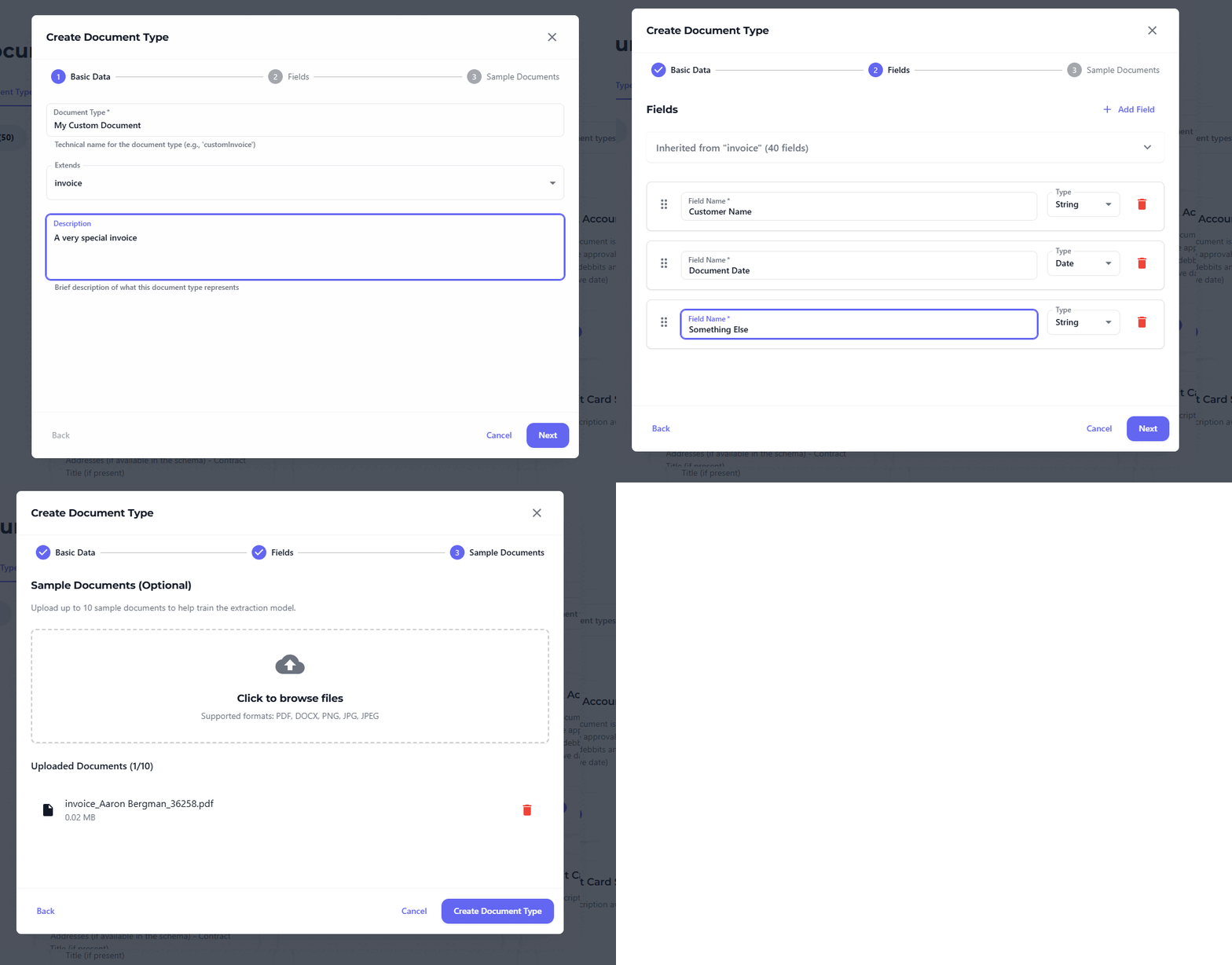
The 3-Step Custom Document Type Process
Step 1: Define Your Document Structure (2 minutes)
Choose your approach:
- Extend existing: Pick the closest base type (Invoice, Contract, Receipt, etc.)
- Create custom: Start with a blank template for unique documents
Configure basic settings:
- Document type name and description
- Processing rules and validation logic
- Approval workflows and routing
Step 2: Define Your Fields (3 minutes)
Add exactly the fields you need:
Simple Fields:
- Text: Customer references, Project codes, Comments
- Numbers: Quantities, Percentages, Measurements
- Dates: Due dates, Inspection dates, Expiry dates
- Selections: Status options, Categories, Approval levels
Complex Tables:
- Line items with multiple columns
- Equipment lists with specifications
- Time tracking with rates and totals
- Materials lists with costs and suppliers
- AI automatically recognizes table structure and extracts all data
Advanced Field Types:
- Calculated fields: Totals, Tax amounts, Discounts
- Conditional fields: Show/hide based on other values
- Validation rules: Required fields, Format checking, Range limits
- Lookup fields: Connect to your business systems
Step 3: Start Processing Immediately (0 minutes setup)
No training. No waiting. Just results:
✅ Upload documents → AI extracts all defined fields
✅ Review and approve → Built-in validation and human oversight
✅ Automate workflows → Route to approvers, integrate with systems
✅ Track and analyze → Full visibility and reporting
Beyond Basic Fields: Advanced Custom Capabilities
Complex Table Processing
AI automatically handles sophisticated table structures:
- Multi-level headers: Nested categories and subcategories
- Merged cells: Complex table layouts with spanning cells
- Calculated columns: Totals, percentages, derived values
- Variable formats: Tables that change structure between documents
- Cross-references: Links between tables and form fields
Dynamic Field Logic
Create intelligent forms that adapt:
- Conditional visibility: Fields appear based on other selections
- Calculated fields: Automatic totals, tax calculations, discounts
- Validation rules: Ensure data quality with custom business rules
- Lookup integration: Connect to your databases and systems for real-time validation
Multi-Document Collection
Process document sets as single step:
- Document collections: Define what exactly you want to collect from your employees / customers
- Approval and Confirmation: Request third parties to review and confirm the results
- Cross-document validation: Ensure consistency across related documents
- Batch processing: Handle multiple related documents simultaneously
Ready to Break Free from Standard Limitations?
The question isn't whether custom document types would help your business—it's how much competitive advantage you're losing by not using them.
Your unique documents are your competitive differentiator. Don't let standard solutions force you into generic boxes.
Transform your document processing from limitation to competitive advantage:
✅ Create unlimited custom document types
✅ Define exactly the fields you need
✅ Process complex tables automatically
✅ Start processing immediately—no AI training required
✅ Integrate with your existing systems
✅ Scale as your business grows